Blocking Time With Nothing but Email
Building agentic-cal: a calendar that writes to Proton, Outlook, and iCloud using invitations instead of APIs, during GBS recovery.
A few months ago I wrote about a personal wiki I built to stop leaking knowledge during recovery. This is the next thing I built. Same constraint, different problem.
The constraint is the one I keep coming back to. Energy is a budget, and on a bad day I am rationing it. When the budget is tight, friction matters more than it should. And few things carry more pointless friction than my own calendar.
I live across three of them. Proton for personal, Outlook for work, iCloud for the family. None of them talk to each other. If I want to protect two hours for deep work, I am supposed to open three apps and block the same slot three times. They never reconcile on their own. It is a small tax, paid daily, and on a low day it is the kind of small tax that ends the productive part of the morning.
The obvious fix is to write a little program that does it for me. The moment you try, you hit a wall that has nothing to do with code and everything to do with permission.
The permission wall
To write to a calendar through the front door, every provider wants you to come through OAuth. Register an app. Request scopes. Store refresh tokens. Then do it again, differently, for the next provider. CalDAV exists, sort of, but iCloud guards it, Outlook merely tolerates it, and Proton does not really offer it at all. You end up maintaining three fragile integrations to solve one problem, and each one is a standing permission negotiation that breaks the day a provider changes its mind.
That is an enormous amount of structure for “put the same event on three calendars.” It felt like the database I almost built for the wiki: too much machinery for what I actually needed.
So I stopped looking for an API and asked a different question. How does a calendar invite actually work?
The trick is that there is no trick
When someone emails you a meeting invitation, your calendar does not call an API. It reads the email. The invite is a small standardized attachment, an .ics file carrying a method called REQUEST, defined by a pair of RFCs from twenty years ago. Your client sees it, renders the meeting, and when you click Accept it writes the event to your calendar and emails a REPLY back to the organizer.
Read that again, because it is the whole design. The client does the writing. The provider already trusts it. Nobody asked for an API key.
So agentic-cal does not integrate with your calendars. It emails them. To block time, it sends each of your accounts a proper meeting invitation, from you, to you. Your native client renders an ordinary invite, you accept, and the provider writes the event. Clients accept. Providers do the writing. No OAuth, no CalDAV, no provider APIs.
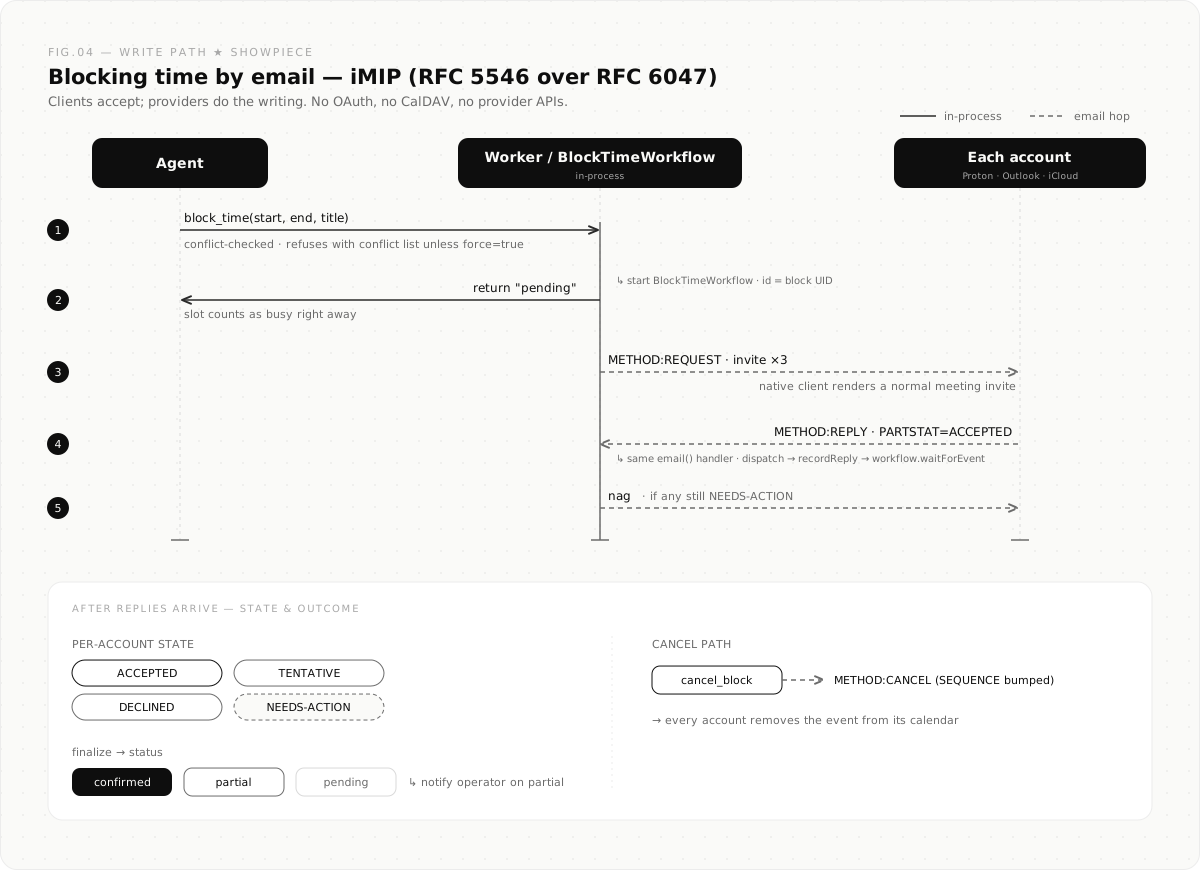
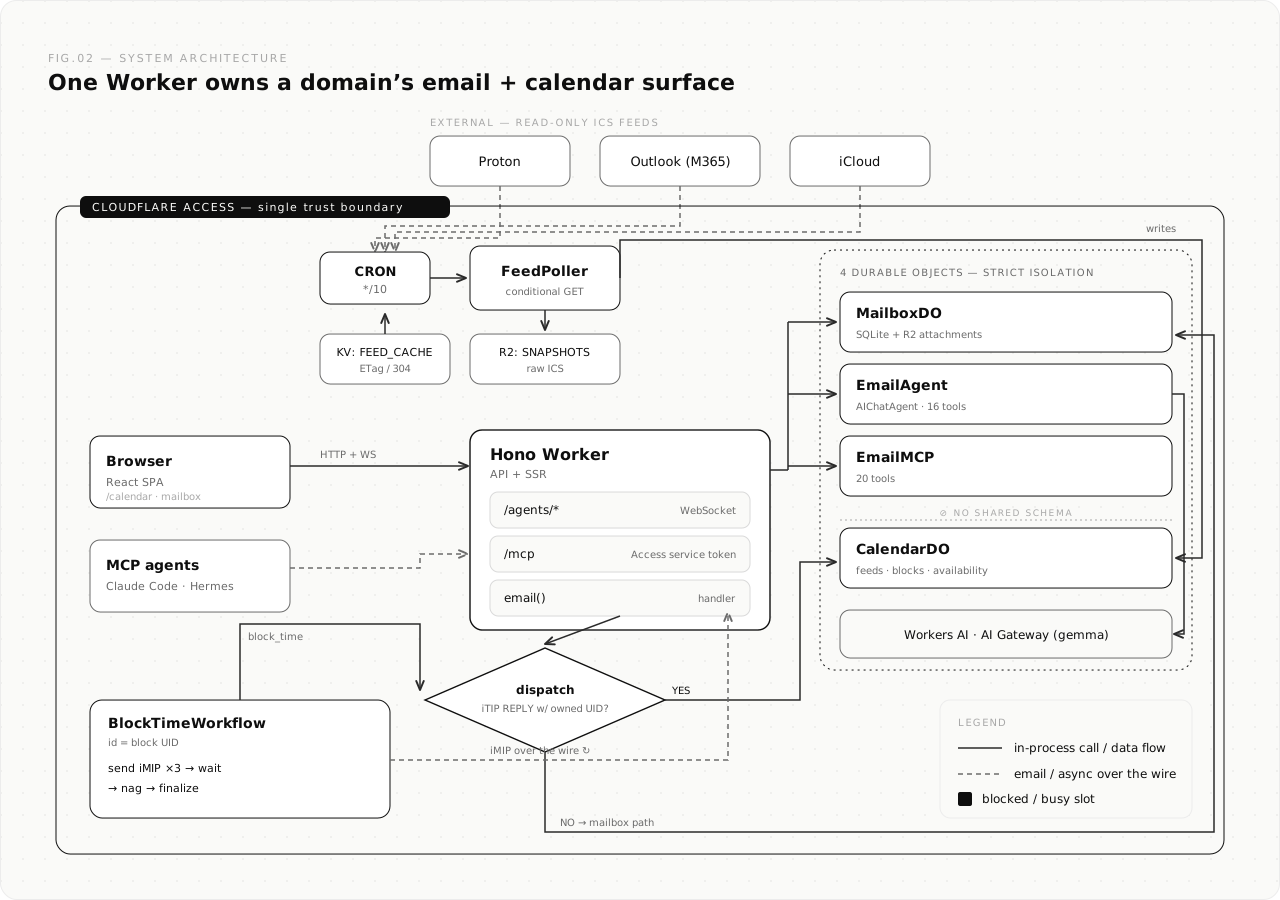
block_time emails an invite to each account; the acceptance routes back into the same Worker, where a workflow tracks who has said yes.Reading is the boring half, and most of the work
Writing is only half of it. To block time intelligently you have to know when you are already busy, which means reading three calendars too. Here I took the boring, reliable path instead of the API path again.
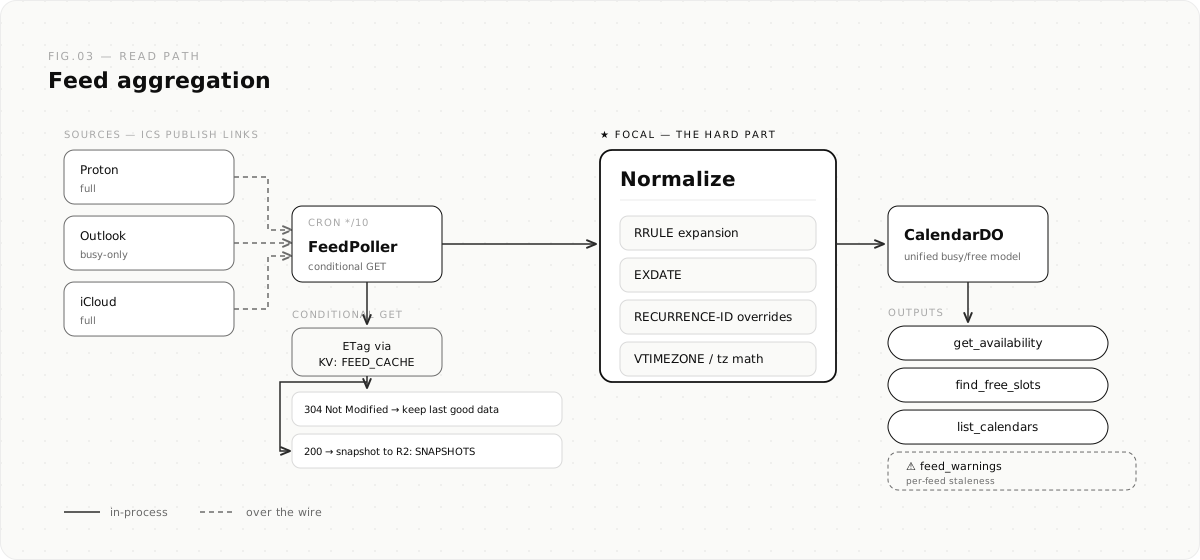
Every provider will quietly hand you a read-only feed if you ask. Proton has “share via link,” Outlook can publish a calendar, iCloud has a public link. They are plain .ics URLs. agentic-cal polls them every ten minutes and only pulls the file down when it has actually changed.
Then it does the genuinely annoying part: turning raw calendar data into a clean busy/free picture. Expanding repeating events. Honoring the exceptions to those repeats. Untangling timezones so a meeting that starts at 8am Pacific lands where it should. That math is where calendar code goes to die, and it is most of the work. The output is one unified model of my time, stitched across all three accounts.
The part I am quietly proud of
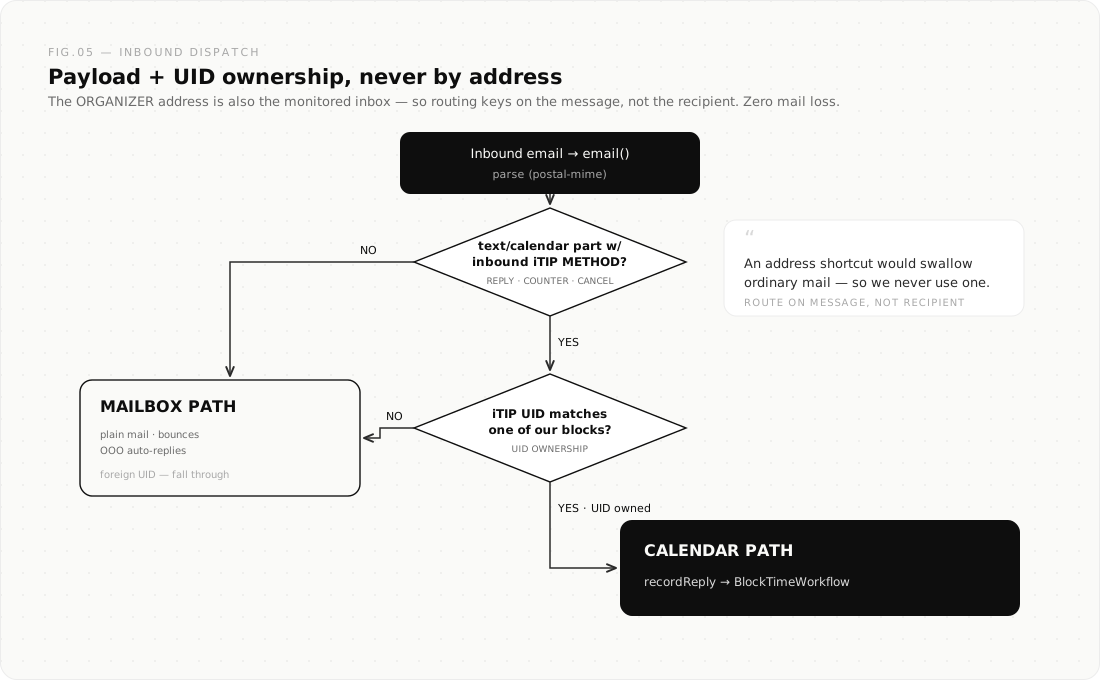
There is a subtle problem hiding in this design. If the system writes by email and accepts by email, then the replies arrive as email, into the same inbox as everything else. How does it tell an RSVP from a normal message without hijacking your mail?
It never routes by who a message is addressed to. It looks at what the message carries. If a message contains a calendar reply, and that reply belongs to a block we actually created, it takes the calendar path. Everything else, real mail, a newsletter, an out-of-office bounce, falls straight through to the inbox, untouched.
Route on the message, never the address. It is a small rule, and it is the one that has to be exactly right, because the failure mode is eating someone’s mail. Getting it right means a single address can be both the organizer and a normal inbox at the same time, and nothing ordinary is ever swallowed.
Then I handed it to an agent
Once the calendar is something you can read and write over plain email, the interesting question becomes who is doing the reading and writing.
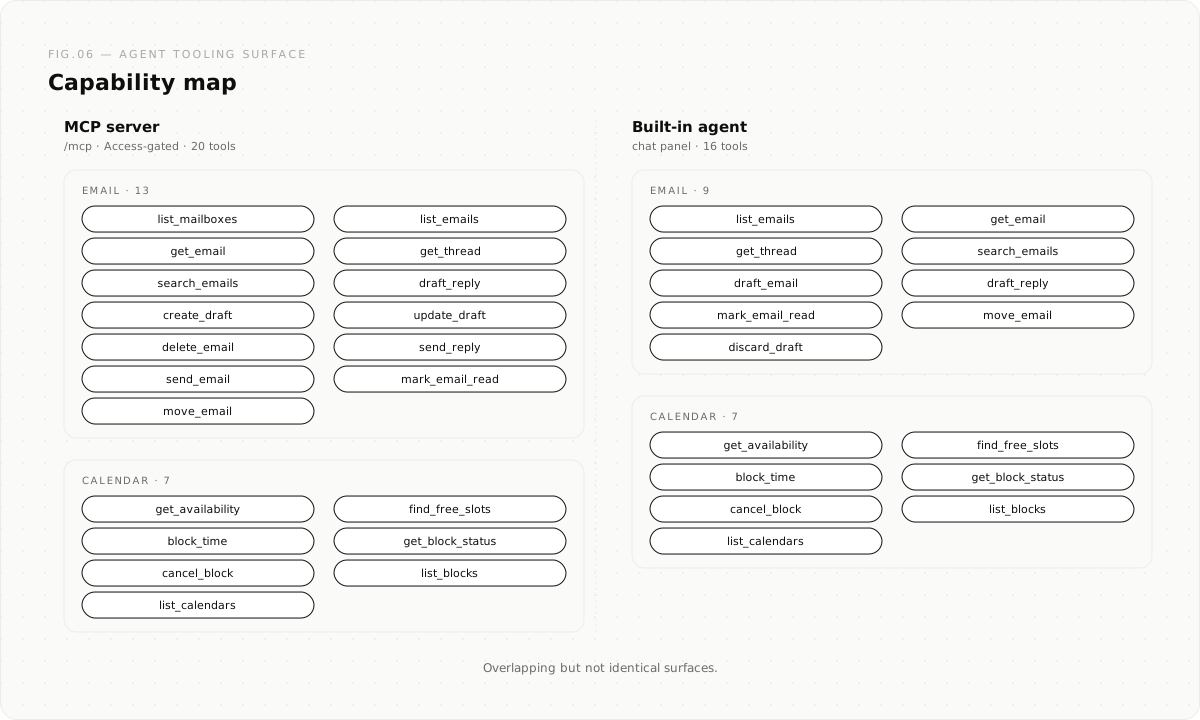
There is an assistant that lives next to the inbox. When a scheduling email arrives, it checks my real availability before it drafts a reply, so it never offers a slot I do not have. Nothing sends without my say-so. And there is an MCP server, twenty tools behind a single auth boundary, so an external agent like Claude Code can read the inbox, check availability, find free slots, and block time the same way I would. The calendar stopped being an app I poke at and became a surface my tools can operate.
All of it on one Worker
The whole system runs on a single Cloudflare Worker. The email client, the calendar, the agent, the invite lifecycle, one deployable unit. The lifecycle of an invitation, send it to each account, wait for the replies, nag the stragglers, finalize, is a durable workflow, so it survives restarts and just keeps tracking who has accepted until the block is settled.
I did not start from nothing. I built on top of Cloudflare’s agentic-inbox, which gave me a real email client as a chassis. I cloned it, renamed it, and grew a calendar out of it.
Why I am telling you how it got built
In the wiki post I said the reason an AI can maintain a wiki and a person cannot is simple. LLMs do not get bored. They will touch fifteen files in one pass and keep everything consistent, every time, without the maintenance burden growing faster than the value.
The same thing is true of a build like this. The work that wears you down is not the idea. It is the relentless, unglamorous tracing. The timezone edge case. The reply that comes back with one field slightly wrong. The dispatch rule that has to be exact. On a tight-budget day, that is precisely the work I cannot afford to do slowly.
So I did not do it alone. I worked with my robot, T9i the way you work with a tireless pair: me holding the shape of the thing and the judgment calls, it holding the details and never getting bored of them. That is the part of recovery I did not see coming. Not that I would get back to building, but how. The constraint did not lift. I found a way to build that respects it.
This is the second thing I have shipped this way. It will not be the last.
Move forward.
agentic-cal is open source: github.com/talalakkari/agentic-cal